Share/Bookmark
Showing posts with label attendance. Show all posts

Saturday, May 30, 2009

Freeware Booking for workshops, events, bed and breakfast, a therapist, ... you name it

Home !
Overview of All Applications !


Get Your Booking System Running in Minutes

  1. Sign up for an account, the basic version is free
  2. Build your schedule by simply picking options from a web page
  3. Try out the working reservation system, you get a link right away
  4. Put the link on your web site so people can start using it

And you're done! It is entirely web based, so there is nothing to install and it works on any computer.

Works with any type of business…

• Health Clubs
• Music Schools
• Chiropractors
• Tennis Courts
• Nail Studios
• Medical Practices
• Financial Advisors
• Dental Offices
• Bed & Breakfasts
• Massage Therapists
• Hair Salons
• Auto Repair
• Photographers
• Golf Courses
and more…


General Features
  • Runs straight from any browser, no downloads needed
  • Intuitive, award winning user interface
  • Try out the entire system for free, only a valid e-mail address is needed
  • Small screen version available for handheld devices
  • Comprehensive context sensitive help pages and tutorials
  • Available 24/7 via secure SSL connections

Customizable Schedule Logic

  • Put time constraints on how long in advance users can book or make changes
  • Set a buffer time to allow for cleaning or travel time in between appointments
  • Indicate a ‘capacity’ to allow multiple reservations at the same time
  • Specify exceptions to regular opening hours, for example for the holiday season
  • Request approval or payment, before confirming a booking
  • Customizable user entry forms, with customizable drop down boxes

International Support

  • Display web pages and e-mails in 6 different languages, end-user selectable
  • Support for all the world’s 500+ time zones and daylight saving time areas
  • Support for 18 different currencies
  • Use any UTF-8 character (European, Chinese, Arabic) in e-mails and text

E-Mail Integration

  • Send appointment reminders to your users, by e-mail or SMS text message
  • Confirm new or changed appointments automatically by e-mail
  • Send yourself notifications of schedule changes to avoid having to check the site
  • Receive a daily report of changes to your schedule in your e-mail
  • Require users to have a valid e-mail address by sending a verification link
  • Notify all users in a time range, for example to notify them of schedule changes
  • All e-mail messages can contain customized text

Reservation Management

  • Access settings to determine who can create, update or delete and within what time frame
  • Appointments can repeat, with complex patterns like the 2nd Saturday every month
  • Automatically keep track of changes by e-mail, daily reports or via calendar synchronization
  • For places without web access create printed reports of the schedule
  • Allow groups to schedule by booking multiple places in a slot at once
  • Many actions can be undone; the trash can retains deleted appointments

Integration with Your Site

  • Use your own domain name to access the schedule, also in confirmation e-mails
  • Gracefully redirects broken URLs back to schedules for your domain
  • Upload a logo and modify colors to match your own site
  • Run a schedule within a frame on your own site
  • Hide our header and footer and provide your own

Setup and Maintenance

  • Easy set up wizard will choose a sensible default configuration for your situation
  • Give ‘super users’ additional access rights to do maintenance tasks
  • Make changes to the schedule logic without taking it off line
  • Or, instead, show a message to anyone but you while you are working on it

Waiting Lists

  • Waiting list queues can be maintained for each separate time slot
  • Automatic placement and notification if a spot opens up
  • Override the normal process with manual placement and to allow overbooking
  • Automatically cancel bookings when no payment is received

Customizable Layout

  • Show your schedule by day, week or month or in list format
  • Change colors and font size to match your own brand look and feel
  • Adjust the scale and the number of hours shown per day
  • Most screens, e-mails and help messages to the end user can be customized
  • Advanced users can edit several parts of the HTML on the page
  • Add your own advertisements and graphics to the page

Payment Processing

  • Automatically process credit cards through PayPal and view the payment status for each booking
  • Capture credit card information on the secure server if you want to do your own credit card processing
  • Manually process checks or bank transfers and e-mail payment confirmations from the site
  • 18 different currencies supported, show customizable payment instruction pages
  • Automatically reinstate expired bookings when payment takes a long time to come in

Customer Management

  • Limit access to your schedule in a variety of ways, including passwords, IP filtering and e-mail address verification
  • View customer history, or upcoming activity
  • Make changes on behalf of a customer to facilitate appointments that come in by phone or mail
  • Block and unblock user accounts, easily detect abuse and revert it
  • Import user list to quickly set up usernames and passwords that you may already have
  • Add supervisor fields that can only be edited by authorized staff

Data Import and Export

  • Automatically publish schedules to Outlook, Apple iCal and Google Calendar
  • Automatically retrieve your free/busy information from Google Calendar
  • Import and export data via standard protocols such as vCard, iCal, XML, Excel and CSV
  • Export user information in a variety of formats, for example to send Direct Mail
  • Export appointment information to Excel, for example to calculate utilization
  • Custom drop down menus in user forms can contain product codes for easy back-end integration
The link is www.supersaas.com

Wednesday, May 27, 2009

Engrade: Freeware for Teachers, Students and Administrators

Home !
Overview of All Applications !


Engrade is a free set of web-based tools for educators allowing them to manage their classes online while providing parents and students with 24/7 real-time online class information. It's private, secure, truly free, and unbelievably easy to use - so join over 50,000 teachers and start using Engrade today.

Engrade » Teachers

Engrade provides you with free, time-saving tools to help you better connect with students and parents.

Easy to Get Started


· Engrade is truly free
· Set up is easy, it takes only five minutes
· It's all web-based, so there's nothing to download or install

Free Public Teacher Website


· Customize your profile picture and welcome messages
· Choose to publicly display your class assignment calendars
· Includes quick links to the log in and sign up pages for students

Free Online Assignment Calendar


· Post homework, tests, in-class events, and discussions
· Attach files and worksheets so students can download them from home
· Students and parents can post comments, questions, and replies
· Easily copy an event to multiple classes

Free Secure Online Messaging


· Answer questions and send notices to students and parents after class
· Safe and SPAM-free - only students' registered teachers can message them

Free Online Gradebook


· Easily point-and-click to enter scores just like a spreadsheet
· Customize your grading scale to your exact settings
· Have Engrade automatically calculate grades or choose to enter them yourself
· Weight assignment categories
· Drop the lowest assignment score in a category
· Excused and extra credit assignments
· Customize the order in which students and assignments are sorted
· Enter scores from home or school or anywhere with a web connection
· Easily print reports and export them to a spreadsheet
· Instant, private online grade reports for students and parents

Free Online Attendance Book


· Easily point-and-click to enter scores just like a spreadsheet
· Enter any custom marks based on your school's system
· Quickly see totals for each student
· Print and export reports to a spreadsheet
· Instant, private online reports for students and parents

View the demo at https://www.engrade.com/demo/

Sunday, April 12, 2009

Free Calculator for Resource Management in Call Centers

Home !
Overview of All Applications !


Here is a brief introduction to the calculator. For more detailed information, press the Help Button which opens a new browser window on your desktop.

  • This calculator, which is based on the Erlang B and Erlang C traffic models, helps you to estimate how many agents you need in your call centre for each hour during an eight hour day. It also works out how many trunks (lines) you need into your call centre to handle these calls.
  • Before you start entering hourly figures, you need to specify some general call details and your service targets into the top area 'Targets and assumptions':
    • Average Call Duration - enter the average call length in seconds into this box.
    • Average Wrap Up Time - This is the time, in seconds, during which an agent is not available to answer a call after completing the last call. It is usually used to complete administrative tasks.
    • Call answering target - Use these two boxes to specify service targets to which the call centre works. For example, if you require that 75% of calls are answered within 15 seconds, enter 75 into the first box and 15 into the second box.
    • Trunk blocking target - This is the grade of service target which is used when sizing the lines into the call centre. It is expressed as a fraction of the total calls which will be lost because insufficient lines have been provided. For example, 0.010 means that 1% of all calls would be blocked.

  • When the target figures have been entered, you can enter the hourly figures into the boxes in the second section. Each line in this section represents an hour. In the first column of each row, you should enter the number of calls received at the call centre in that hour. As soon as you leave the box, the remaining three boxes are calculated for you. They show the average delay which will be experienced by all calls, the number of agents required during that hour, and the number of lines required to carry that traffic into the call centre.
  • Once you have entered the hourly figures, you can change the Targets and assumptions figures which you entered into the top area of the calculator. The hourly calls figures will remain, but the results will be removed. To recalculate the hourly results, press the Calc. button.
  • The bottom section of the calculator summarises the daily call centre estimates. The first box shows the name of the busiest hour, the second box shows the number of agents required during that busiest hour, and the final box shows the number of lines required into the call centre to carry the peak traffic. Remember that although you can dynamically change the number of agents on duty, the number of lines installed are fixed, and must be sufficient to cater for the peak traffic.
The only application can be found at http://www.ansapoint.com/calculator/call/

Care2X as Integrated Hospital Information System Freeware

Home !
Overview of All Applications !


CAR2X is an Integrated Hospital Information System.

Care2x integrates data, functions and workflows in a healthcare environment. It is currently composed of four major components. Each of these components can also function individually.

  • HIS - Hospital/Healthservice Information System
  • PM - Practice (GP) management
  • CDS - Central Data Server
  • HXP - Health Xchange Protocol
    PHP,mySQL,PostgreSQL. Surgery, Nursing,Outpatient,Wards,Labs, Pharmacy, Security,Admission,Schedulers, Repair, Communication & more. Multilanguage, WYSIWYG forms, userconfig, embedded workbots. Modular & scalable.

  • Open source software for hospitals and health care organizations designed to integrate the different information systems existing in these organizations into one single system. CARE2x solves the problems inherent in a network of multiple programs that are noncompatible with each other. It can integrate almost any type of services, systems, departments, clinic, processes, data, communication, etc. that exist in a hospital.

    Functions include:
    • telephone directory;
    • admission system;
    • patient documentation;
    • duty planner;
    • nursing ward administration;
    • operating room documentation;
    • laboratory exam management;
    • radiology film editor;
    • pharmaceutical products order system;
    • medical depot;
    • electronic data processing;
    • email;
    • and more.

    Versions include English, German, Indonesian, Italian, and Brazilian-Portuguese.

    Care2x HIS is a smart software for hospitals and health care organizations. It is designed to integrate the different information systems existing in these organizations into one single efficient system.

    Care2x HIS solves the problems inherent in a network of multiple programs that are noncompatible with each other. It can integrate almost any type of services, systems, departments, clinic, processes, data, communication, etc. that exist in a hospital. Its design can even handle non-medical services or functions like security, maintenance, etc. It is modular and highly scalable.

    Care2x HIS uses a standard SQL database format for storing and retrieving data. The use of a single data format solves the problem of data redundancy. When configured accordingly, it can support multiple database configuration to enhance data security and integrity.

    It is a web based software and all its functions can be accessed with a common web browser thus there is no need for a special user interface software. All program modules are processed on the server side. Module updates and extensions do not require changes on the browsers thus there are no network interruptions and downtimes. Its design supports multiple server configuration to distribute traffic and improve speed and efficiency.

    Care2x HIS is an open source development (OSD) project and distributed with a "GNU General Public License". Its source code is freely-distributed and available to the general public.

    To see a functioning application of Care2x HIS, go to Online HIS - a virtual hospital using Care2x HIS as its system (username = demo , password = demo).

    Sample Application

    (Virtual HIS) is based on a real existing hospital operating in Stuttgart, Germany.
    The icon signals that a barcode scanner is supported.
    Main menu:

    Functions

    Home

    Standard intranet browsable pages for the hospital presenting general information, news, etc. Online editing with WYSIWYG editor.

    Person

    Registration of person's basic personal data (demographics). This module stores and processes personal data for all persons not just patients. Display of past and current EMR records. Scheduling new appointment, PDF document, etc.

    Appointments

    Display of appointments according to date, department or clinician involved. Scheduling new appointment.

    Admission

    Patient admission system with search and archive functions. Barcoded labels and wristbands. Edit and display of current EMR records. Creation of sickness/incapacity certification, PDF document, charts folder, test request scheduler, etc.

    Ambulatory

    Outpatient module with waiting list, pending request processor and admission list.

    Medocs

    A text based documentation system for both inpatient and outpatient departments, patients' medical history, etc. This is the replacement to an aging proprietary software.

    Doctors

    Duty planner for physicians and surgeons among others. Quick view.

    Nursing

    Nursing wards administration, patient bed planner, patient data monitoring, nurse planner, appointment scheduler, patient search, documentation, patient data folders, test request scheduler, on-duty doctor quickview, lab test results, DRG documentation, photo documentation, etc.

    OR

    Operating Room. Documenting surgical operations (surgery, anesthesia, nursing, material, medicines, etc.), OR duty planner, search and archive functions, international ICD and OPS documentation systems, surgical operation planner, DRG intra/post op diagnosis/procedures documentation, etc.

    Tech support

    Technical support and maintenance. Reporting damage and requesting repairs. Info query system. Automatic signalling for reception of queries and requests. Documentation of technical jobs. Information system.

    Laboratories

    Entering and displaying laboratory examination results for patients. Pending tasks processor. Currently, the blood bank, medical/serological, pathological, bacteriological laboratories are functional.

    Radiology

    Search and display of x-ray/DICOM films with integrated editor and reader of diagnostics results. Dicom viewer and file uploader.

    Pharmacy

    Ordering of phamaceutical products. Organizing quick order catalogs. Pharmacy database management. Automatic signalling of reception of orders. Product search and archive functions.

    Medical depot

    Central depot for medical products and other materials. Ordering system. Organizing quick order catalogs. Product database management. Automatic signalling of reception of orders. Product search and archive functions. Product search and archive functions.

    Directory

    Telephone directory of the hospital with functions for search and entering new phone information.

    EDP

    Electronic data processing department. This is accessible only with SystemAdmin rights. Access rights management, database server administration, configuration functions, etc.

    Intranet email

    Database based mail system for internal communication. The communication protocol is intentionally non-standard to prevent standard mail programs from accessing the mail data.

    Internet email

    Email system using standard internet mail protocols. Can be used to send or receive mails from the internet if allowed by the network.

    Specials

    Special tools and functions. Document editor modules, address/plugin/personnel managers, duty planner, news editor and submission system, color options configurator, access password manager, photolab, integrated intracam surveilance system, among many others.

    Login

    Allows automatic loading of the user's personal preferences or the computer's particular configuration. Logging in gives the computer an identity which facilitates many automation features, otherwise the server will assume default values.

    Language selector

    The application is now available in several languages: Arabic, Bahasa Indonesia, Brazilian, Bulgarian, Czech, Chinese-simplified, German, English, Spanish, French, Italian, Dutch, Norwegian, Polish, Portuguese, Romanian, Vietnamese, Serbian, Bosnian, Farsi.
    English and German language versions are 100% complete. Though not all language versions are 100% complete.

    Sunday, March 22, 2009

    School Teachers Electronic Attendance Freeware Register Software


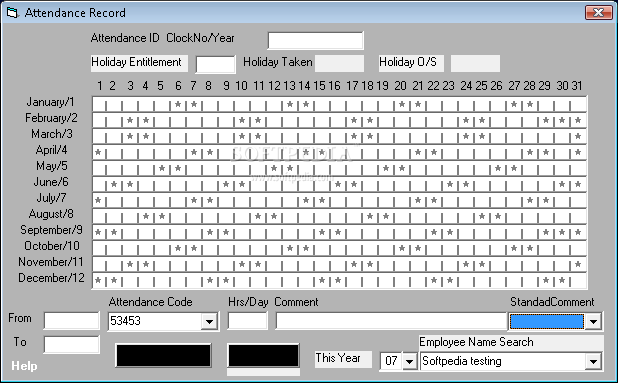
    STEARsoft (School Teachers Electronic Attendance Register software) is designed to provide an electronic version of a class attendance register. This porduct also provides features that are useful for making notes and recording incidents.

    Full functionality is obtained from the PC component of this product, but the software is designed to work in conjunction with a handheld Palm powered PDA for optimum performance.

    This software will allow quick production of blank registers for normal use, but also will give you an electronic system that looks just like a traditional register to allow you to move towards a paper-free system.

    Here are some key features of "STEARsoft":

    · Specify the structure of your school day.
    · Quickly enter your timetable
    · Specify term dates with ability to identify days off
    · Automatically generate register pages for the whole year using timetable information
    · Mark an attendance register, including quick default entry capabilities
    · Easy attendance edit functionality
    · Attach individual notes to any register entry
    · Customise House names or class labels (eg A,B,C,D,... or 1,2,3,... etc.)
    · Set up, or import, class data (including pupil names and key data)
    · Synchronise data to a Palm device for convenient portable access
    · Assign and keep track of incidents relating to individual students.
    · Customise code letters for quick annotation of registers
    · View a summary of registration data.

    The downloadlink is http://www.stearsoft.co.uk/download.php

    Thursday, February 26, 2009

    TimeTrex open source payroll and time management software


    What you'll get... on online free application with:

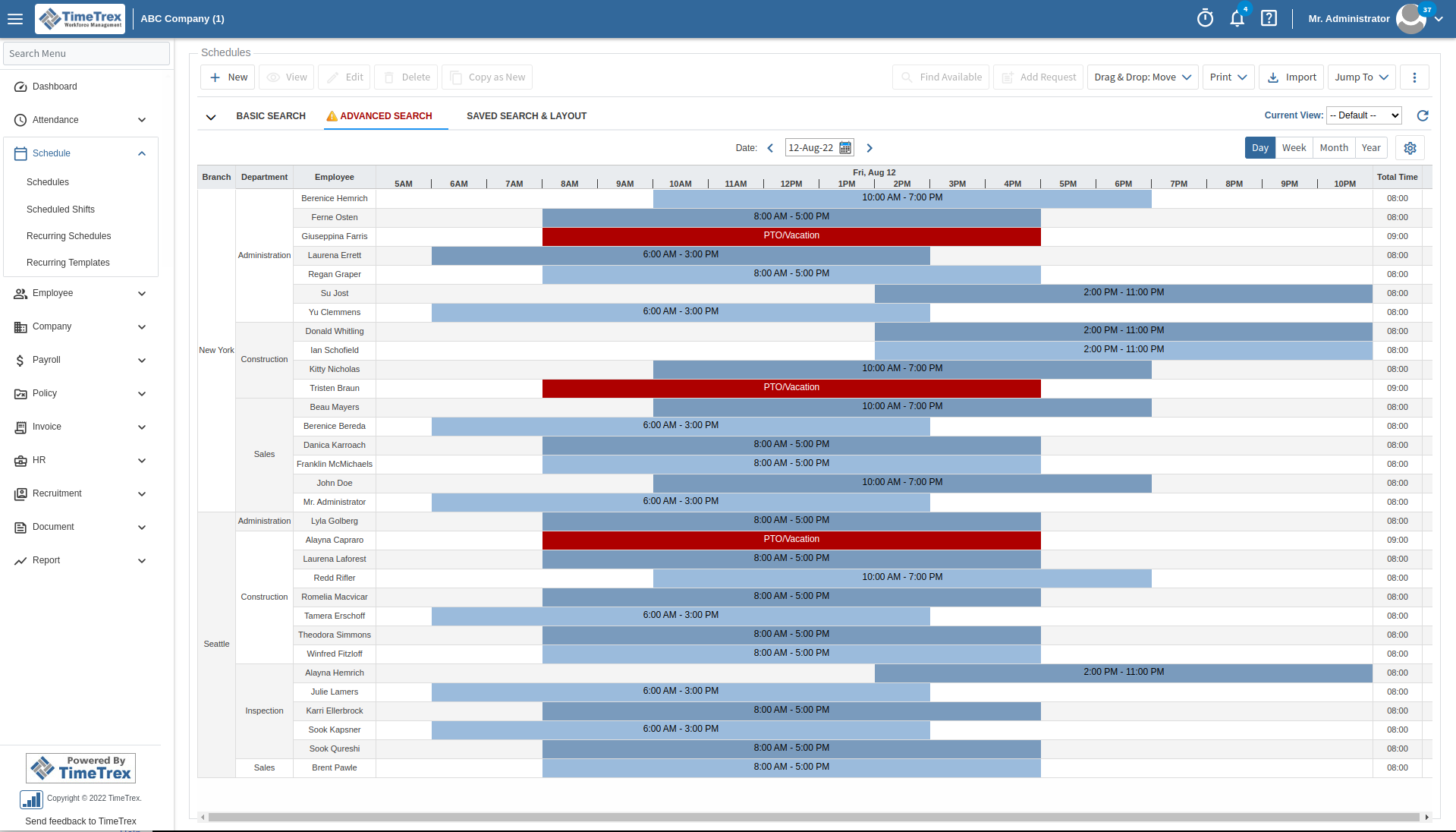
    * Employee Scheduling module with flexible pattern scheduling that minimizes data entry and eliminates the need to manually create schedules on a regular basis.

    * Time and Attendance module to efficiently track and monitor employee attendance, including tardiness, missed punches, overtime and vacation time.

    * Payroll module with fully integrated start to finish payroll processing at the click of a button, tax and benefit calculations, tax reports, check printing and direct deposit functionality.

    * NO employee limits, NO time limits, NO annoying advertising!


    Video Demonstration

    Watch as a TimeTrex expert demonstrates the features and benefits that TimeTrex Payroll and Time Management can offer your organization.

    Introduction Duration: 13mins

    Self Serve Demonstration

    Feel free to jump in and take a look around, if you like what you see we would be happy to setup a personalized indepth demonstration for you where a TimeTrex expert will walk you through all the features and benefits that TimeTrex Payroll and Time Management has to offer.

    Self Serve Demonstration Login:

    Monday, December 29, 2008

    Seating Chart Freeware to Organize your Events Appropriately

    Home !
    Overview of All Applications !

    What is SimpleSeating?

    SimpleSeating.com is the fastest and easiest way to make seating charts online. Experience the power of expensive desktop seating chart applications on the web without the learning curve. Create, preview, and print your seating charts in just a few simple steps.

    With just a mouse and a web browser you’ll be organizing your guests via drag-n-drop controls within minutes. When you’re done print out your seating arrangement or share it online. Simple.

    Plans starting at... FREE!

    SimpleSeating is the perfect tool to organize seating arrangements for your events.

    The link is simpleseating.


    Sunday, November 2, 2008

    Easy HR date Calculator

    Home !
    Overview of All Applications !


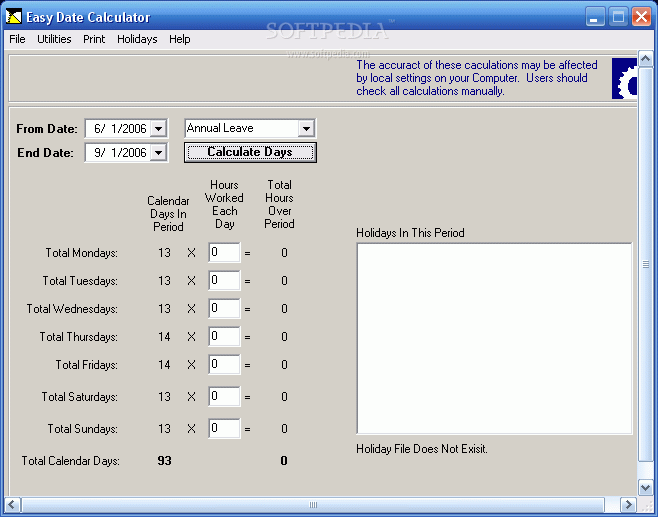
    Easy HR Date Calculator is a useful tool that makes it easy to calculate leave payments, workers comp payments.

    It allows you to quickly and easily calculate the number of working days between two dates. It also calculates the normal working hours between those dates, and advises you of any holidays that are occurring within the given period.

    Here are some key features of "Easy HR Date Calculator":

    · Easy to use and configure.
    · Quickly calculates the number of working days and holidays between two dates.
    · Easily select dates using a pop up calendar.
    · Use it to calculate days absent for Annual Leave, Sick, Workers Compensation, etc.
    · Easy to enter holiday dates - simple text file database structure. File can be edited in Word, Notepad, etc.
    · Easy to enter holiday dates - Add holidays from within the application. No need to manually edit text files or worry about regional date format issues.
    · Smart logic warns user when there are no more future dates in the database. It may be time to add next years dates !
    · Ability to recognise and warn user of invalid holiday dates in the database.
    · Ability to include a description for each holiday date.
    · No limit to how far in the future you can set up your database. You could set it up now for the next 6 years if you knew all the holidays.
    · Compatible with all regional settings.
    · Ability to add a line of comments to the database that is not read during a calculation.
    · Preset 'quick menu' for common Australian work patterns. (We can add others, please ask.)
    · Calculates the number of hours to pay an employee for each day between the selected dates.
    · Calculates total number of hours to pay an employee.
    · Print your calculation for filing in the employees file.


    This product is free for non commercial use. you must register if you wish to use the application within a commercial environment.

    The downloadlink is http://www.easyhr.com.au/software/easy_date_calculator.htm

    Sunday, July 6, 2008

    Whos In Out Board Freeware for Receptionists

    Home !
    Overview of All Applications !


    WHOS IN Pro In Out Board description

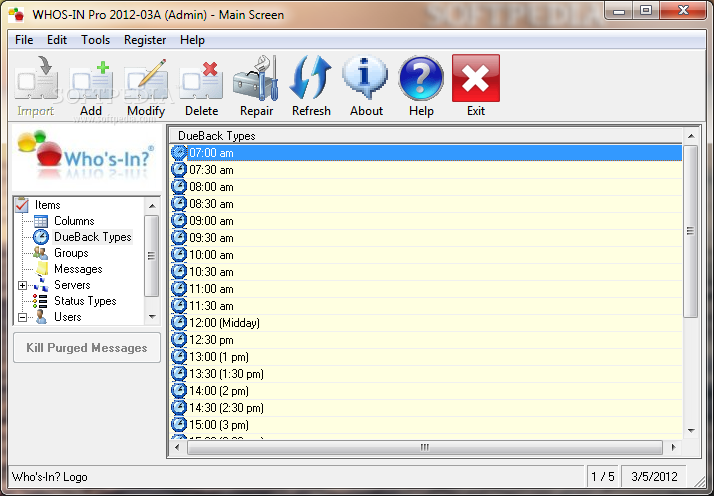
    WHOS-IN Pro 2008 is THE multi-award winning, easy-to-use, in-out board for businesses and organizations that would like to know who's in and who's out of the office. (or as several forward thinking families are doing, using it at HOME!)

    WHOS-IN Pro is ideal for receptionists (and anyone else on your LAN) because there is no more time wasted checking a wall-mounted Office Board to see if someone is In, Out, or at Lunch... all the information you need is presented on screen in an easy to read format. Best of all, the 5 user version is FREEWARE.
    No nag screens, no disabled features, no time limitations - you can use it forever at absolutely no cost! What's more, they also offer 100% free support (even for the freeware version)!

    Locates your office coworkers efficiently with WHOS-IN Pro LAN based in-out board
    WHOS-IN Pro is an easy to use Windows in-out board application for businesses that need to keep track of who's in and who's out of the office.

    WHOS-IN Pro 2007 is THE multi-award winning, easy-to-use, in-out board for businesses and organizations that would like to know who's in and who's out of the office. (or as at least one forward thinking family is doing, use it at HOME!)

    WHOS-IN Pro is ideal for receptionists (and anyone else on your LAN for that matter) because there is no more time wasted checking a wall-mounted Office Board to see if someone is In, Out, or at Lunch... all the information you need is presented on screen in an easy to read format.

    Since 1995, WHOS-IN has achieved over 1,000,000 downloads, and with over 500,000 registered users, this makes WHOS-IN Pro the world's most popular in out board (taking over from the Novell product which is no longer available). Yes, there are many imitators out there, but if you want the original & the best, you've come to the right place.

    Having a snapshot or 'status view' of your co-workers whereabouts makes it possible to give better information to callers, and to avoid putting telephone calls through to employees who aren't at their desks. WHOS-IN Pro also reduces wasted time when an employee needs to find a co-worker to talk to him or her.

    Setting your (or someone else's) status is VERY simple, fast & intuitive, ensuring that the program will be used consistently. A simple 'Out to Lunch' notification requires as little as one mouse-click, and you are on your way. WHOS-IN Pro can also set your Status to IN when the program starts, and OUT when it shuts down, which further enhances its ease-of-use, and gives the added benefit that people don't need to remember to update their own status at these times.
    New in the Pro version is a 'Status Alert' system which can inform you when a co-worker returns to the office - an invaluable aid if you urgently need to see or speak to someone.

    WHOS-IN Pro can also access remote copies in branch offices across your high-speed (T-1 preferred) Wide Area Network, allowing you to examine the status of people at an interstate or inter-city location. Imagine the time & money saved in long distance phone calls if you already know someone is 'On Vacation' for example. Equally, there's no need to restrict the use of WHOS-IN Pro to just people either... You can just as easily keep tabs on Vehicles, Laptops, Cell Phones, Meeting Rooms, or just about any other item you care to think of - the potential uses are almost limitless.

    WHOS-IN Pro is designed to be easy to use, however it is also highly configurable, with user defined colored 'Status' buttons on the ToolBar, Groups / Departments, custom company logo for the background, system & user access levels, and much much more. We also encourage user feedback, and incorporate new features ASAP. Most of what you see in WHOS-IN Pro today is the direct result of user suggestions made over the last 10+ years.

    WHOS-IN can also set your Status to IN when the program starts, and OUT when it shuts down, which further enhances its ease-of-use, and gives the added benefit that people do not need to remember to update their own status at these times.

    WHOS-IN can also access remote copies in branch offices across your high-speed (T-1 preferred) Wide Area Network, allowing you to examine the status of people at an interstate or inter-city location. Imagine the time and money saved in long distance phone calls if you already know someone is On Vacation for example.

    Equally, there is no need to restrict the use of WHOS-IN to just people either... You can just as easily keep tabs on Vehicles, Laptops, Cell Phones, Meeting Rooms, or just about any other item you care to think of - the potential uses are almost limitless.

    Here are some key features of "WHOS IN Pro In Out Board":

    · Improves customer service - no more clients waiting on hold while the receptionist (or anyone else on the network) locates the requested person.
    · Status Alerts inform you when people return to the office (optional).
    · Send Post-It™ style notes between users (optional).
    · Colored buttons indicate user Status.
    · Add your own Status Types.
    · Add your own Custom Columns (with optional 'read-only' setting).
    · Add your Company Logo as a background image.
    · Links to our WYWO (While You Were Out) software (sold separately).
    · Groups / Departments allow segmenting people into their own areas.
    · Not limited to tracking people - You can also use WHOS-IN Pro for monitoring Vehicles, Meeting Rooms, Notebooks, Cell Phones etc. anything you need to keep tabs on.
    · Links to MS-Exchange compatible mail systems (e.g. Outlook) allowing you to create email messages to one or more people in one easy step.
    · Roaming user profiles - Allows you to use WHOS-IN Pro no matter which PC you log in from (utilizes your network login script).
    · Allows multiple people to share a single PC (simultaneously).
    · Auto login & logout can update your status whenever Windows Opens or closes.
    · Uses MS Access format database (Access not required).
    · Ascending / descending column sorting.
    · Supports connecting to branch office servers via high-speed WAN.
    · Ultra efficient network bandwidth utilization - virtually no impact on traffic.
    · Small code size (program is around 1.5MB)
    · Group Change feature allows you to update the status of many people with just a few mouse clicks.
    · Fast In / Out / Busy buttons for single mouse click status change.
    · 11+ years of stability... WHOS-IN development began Nov 1994, and was first released April 1995. It continues to be refined and improved.


    Requirements:

    · Ideal for Citrix & MTS users (only a single 'folder' to publish)
    · Any UNC or peer-to-peer server.

    Sunday, June 22, 2008

    Visual: Free HR Software for Small Enterprises

    Home !
    Overview of All Applications !

    Download a complete HR system with all the tools you need to manage employee information such as:

    -Contact details
    -Leave
    -Training
    -Appointments
    -Contracts
    -Remuneration
    Download now IT IS FREE!

    The website with te downloadlink is http://www.vizual.co.za/

    Sunday, June 15, 2008

    Free Visitors of the Company Software

    Home !
    Overview of All Applications !


    Visitors Of The Company is a small easy-to-use application designed for keeping track of the people who visit your company.

    Here are some key features of "Visitors Of The Company":

    · It is filled by security guards on an entrance. It can insert up to 3 photos of pages of the Passport or Face for each visitor. Capture of images is made from a Web-camera connected to a computer.
    · Automatic filling of the directory of visitors at input new. The directory of employees with search on a surname.
    · The carrying mode with automatic input of the handed over passings and entering of time of a leaving is realized. Searches on base and the directory of visitors.
    · Search on a surname, a first name, a second name, num. of the passport, to the address, a place of work, number of the pass.

    The Downloadlink is http://www.araxgroup.ru/eindex.htm

    Wednesday, May 7, 2008

    School, Student,Class en Session Management also for training companies

    Home !
    Overview of All Applications !


    School Management System is a useful system that was created for automating the student and class management. But it can also be used by educational companies delivering trainings, courses, teachings, lessons, workshops, ...


    School Management System is a useful system that was created for automating the student and class management in midsized schools. Created especially for meeting the requirements of small and midsized schools (read also training institutes) in:

    · Student management
    · Class management
    · Teaching sessions management
    · Students attendance management
    · Reports
    · Multiuser work over LAN
    The home-page-link is http://www.headmastersoft.com/

    Monday, April 28, 2008

    Free Staff Holiday Planning Online

    Home !
    Overview of All Applications !


    Managing your staff holiday can become a real problem! WhosOff can help. Enter your staff names, their entitlement, who cannot be off and WhosOff does the rest. Managers and staff are notified by Email. You can use the Approval system for managers to approve or decline or have the system accept requests automatically. Track Sickness and meetings!


    There are plenty of online in-out boards available (many are downloadable apps--feh). What makes this one somewhat different is it has smarts. You can set up rules to make sure your two customer service people aren't out of the office at the same time. The system also tracks vacation time that accrues annually, and won't let staffers book more time off than they have coming to them....


    WhosOff.com makes easy work of staff holiday planning applying restrictions between staff where applicable, application followed by approval by manager and a transparent view to all those involved within the organisation online anywhere.


    Users enter their holiday/vacation start date and end date (or number of days). WhosOff quickly checks if they have enough entitlement, any restrictions and input rules, and allows the request through for final approval by the User’s Approver/notify manager.


    (The system can be used without the Approval process if required)


    Site Journal: a freeware solution for A Syndicus, Architects,Construction Companies

    Home !
    Overview of All Applications !


    The Site Journal for Windows is intended to help site-supervising architects


    The Site Journal is intended to help site-supervising architects, engineers, and construction companies document site inspections. All important data, events and associated site photos are conveniently processed and managed with this slim and fast program.


    Site Journal enables site-supervising architects, engineers, owners, and building contractors to record their site inspections in a simple and easily readable manner.


    In addition to multiple input modes, Site Journal stands out because of the following features: fast and convenient navigation between the individual daily reports.

    Input of the individuals and companies implicated in the construction project and access to this data within the applications structure.

    Photos showing the performance level and defects can be attached in the daily reports.


    Here are some key features of "Site Journal":


    · Quick recording of:

    · Weather, temperature and humidity

    · Attendees and site staffing

    · Performance level, deficiencies, delays, hindrances, and acceptance

    · Instructions and additional works given

    · Execution of important building operations, tests and measurements

    · Statements on materials, deliveries, storage, test specimen, and drawing deliveries.


    The link is site-journaldotcom

    Saturday, March 1, 2008

    Free Personnel Manager Software

    Home !
    Overview of All Applications !


    Personnel Manager Software enables the user to maintain information of Human Resources/Personnel.


    Personnel Manager Software simply verifies attendances, sicknesses, lateness, holidays and employees near retirement. Personnel Manager Software compares hours absence and absence frequency and reports on holiday entitlement.


    It's simple to use and one has an overview over one employee at a time. It could be used as one of the "KPI's" for appraisals and evaluation interviews.

    The download link is http://homepage.ntlworld.com/gb.reynolds/PersonnelManager.zip

    Human resource freeware software is a weblog dealing with human resource softwares.

    The main purpose is to help small, medium and large companies to create a completely functional Human Resources department. So this weblog will deal with software that enables one to create such a department.


    The human resources software will deal with topics as: personnel development, personnel employment, training, recruitment, human resources time management, ... Let's say all areas that one can use in order to create a well functioning HR-department.


    This weblog will help human resources managers because they don't have to research free software because those resources will all be collected in this weblog. This will in itself facilitate the human resource development and services.


    Human resource software will be added on a weekly basis. If you like to add questions, suggestions, ... you can fill out the poll which you can find at the right bar or subscribe to my RSS-feed.